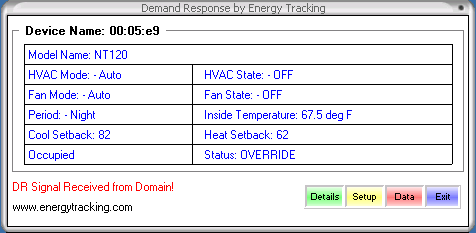
Energy Tracking has created a software based demand reduction application: DR@Desktop. This application can help end user's reduce peak demand and conserve energy. This application can work in conjunction with our web enabled meter or independantly with the IP enabled thermostat manufactured by Proliphix Inc. Alternatively, the meter can be purchased with the ability to control the thermostat independently.
Case 1:
The DR@DeskTop application periodically communicates with Energy Tracking's web enabled meter and a web enabled thermostat (available from Proliphix Inc. ) and will shutdown the A/C compressor for a pre-defined period. Under this scenario, the user can configure a kW threshold to disengage the A/C for a specified period. The duration of the 'OFF' time for the A/C compressor is user defined.
Case 2:
The DR@DeskTop application periodically polls a user defined Domain to check if a 'Demand Reduction / Response' is required. Upon receipt of a signal, the DR@DeskTop application will increase the temperature setting thereby shutting down the A/C compressor. The duration of the 'OFF' time for the A/C compressor is user defined or can be Utility defined.
Case 3:
Our web enabled meter has this technology integrated and can independantly control the thermostat. It can initiate demand reduction based on a user defined kW threshold or / and access a local or Internet domain web site to check if demand reduction needs to be engaged.
Case 4:
The end user can set the 'kW Threshold' (trigger) value to 0. This will enable the DR@DeskTop application to cycle the A/C compressor periodically based on user defined ON / OFF duration settings. In this case, the IP thermostat is directly accessed and does not require a signal from a web domain or a kW reading from the meter.
More details can be found at: Advanced Meter Demand Response
Download Application: DR@DeskTop Application
Download Manual: DR@DestTop Manual
| Solutions | kWh Meter | Reports | Pulse Logger | Overview | Energy@DeskTop | Applications |
| 
